ChatGPT for Managers: A Practical Starter Guide
If you're a manager wondering how to actually use AI at work, you're not alone. Most articles about AI tools for daily management tasks focus on theory or generic use cases. This guide cuts through the noise with practical AI skills for people managers who need real solutions today.
Why Managers Need a Different Approach to AI
Here's the reality: managers don't have time to become AI experts. You're juggling one-on-ones, project deadlines, performance reviews, and the constant stream of emails that define modern leadership. What you need are practical AI examples for managers that solve actual problems.
Think of ChatGPT as your thinking partner, not a replacement for your judgment. It's particularly useful for the cognitive heavy lifting that fills your day: structuring thoughts, finding the right words, and organizing complex information. When managers use AI for project planning, meeting preparation, or drafting team updates, they're amplifying their capacity to lead well.
Four High-Impact Ways Managers Can Use AI at Work
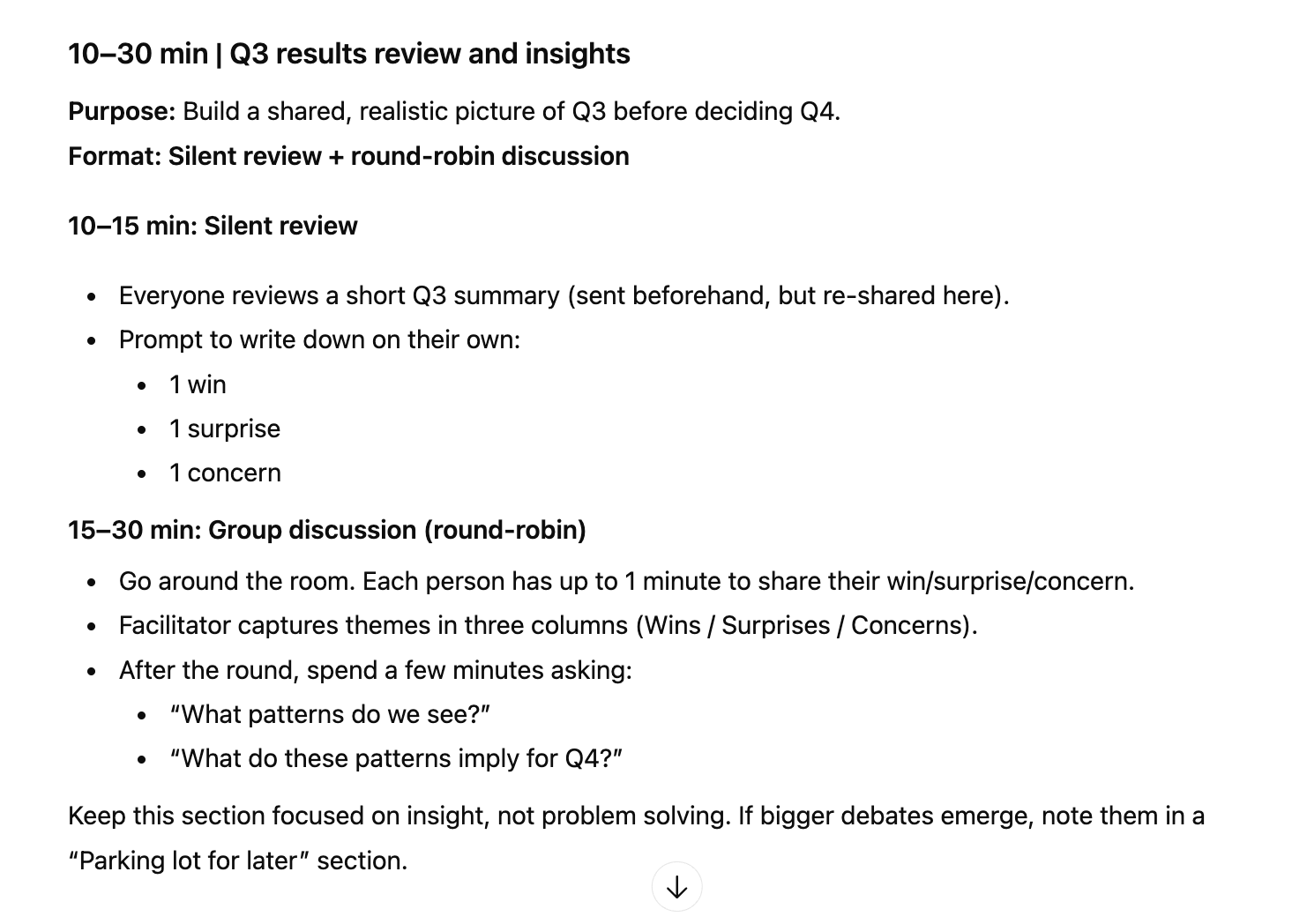
ChatGPT answer for making meetings flow better
1. Planning Meetings That Don't Waste Everyone's Time
Bad meetings cost your team hours they'll never get back. Using AI for meeting preparation helps you design sessions that are focused, inclusive, and productive.
Let's say you need to run a quarterly planning session with your team. Instead of staring at a blank document, start here:
Starter Prompt:
I'm planning a 90-minute quarterly planning meeting for my team of 8 people. We need to review Q3 results, identify Q4 priorities, and address ongoing challenges with cross-functional dependencies. Design an agenda that keeps us focused and gives everyone a voice. Include time allocations and suggested discussion formats for each section.
ChatGPT will give you a structured agenda you can refine. But here's where it gets more valuable—use it to prepare for the difficult parts:
Follow-up Prompt:
One person on my team tends to dominate discussions. Another rarely speaks up. Suggest facilitation techniques I can use during this meeting to ensure balanced participation without putting anyone on the spot.
This is how leaders use AI in the workplace effectively. Use AI to expand your toolkit when facing common management challenges.
2. Drafting Emails and Talking Points
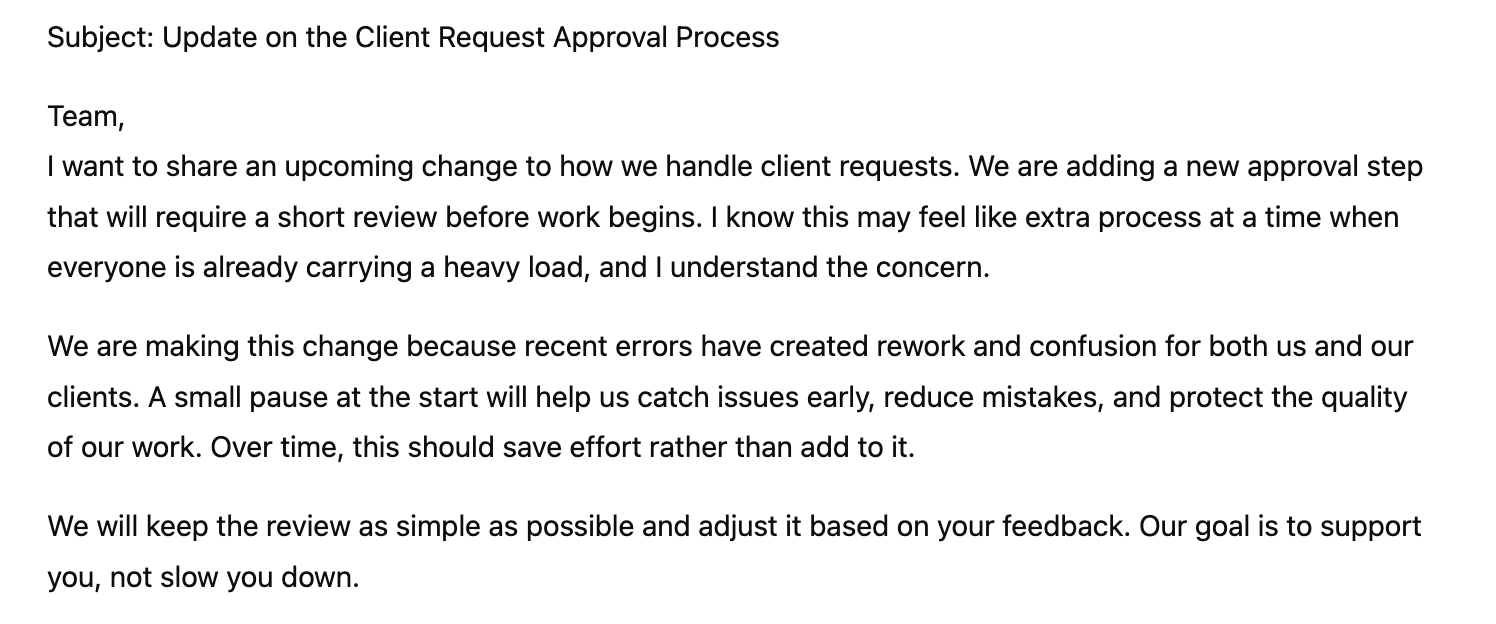
Drafing talking points is an easy way to get started using AI for managers
How much time do you spend staring at a blank email, trying to find the right tone? Whether you're announcing organizational changes, giving feedback, or navigating a sensitive situation, generative AI for team productivity means getting to a strong first draft faster.
Say you need to announce a process change that your team won't love:
Starter Prompt:
I need to write an email to my team announcing that we're implementing a new approval process for client requests. This will slow down their work in the short term, but it's necessary to reduce errors. The team is already stretched thin and will see this as more bureaucracy. Write an email that acknowledges their concerns, explains the reasoning clearly, and ends on a forward-looking note. Keep it under 200 words.
Notice what this prompt includes: context about the change, why it matters, how the team will react, and specific requirements. That's the key to AI prompts for managers, you have to give enough context to get useful output.
For performance conversations, try this approach:
Starter Prompt:
I need to have a development conversation with a team member who has strong technical skills but struggles with communication. They often provide incomplete updates and seem defensive when asked for clarification. I want to address this constructively while recognizing their strengths. Draft talking points that open the conversation positively, give specific examples of the issue, and suggest actionable next steps.
This is using AI to prepare for difficult conversations. You're not outsourcing the conversation itself, but ensuring you enter it with clarity and structure.
3. Summarizing Documents and Extracting What Matters
Managers drown in information. Project briefs, strategy documents, lengthy email threads—how to use AI to write clearer feedback to your team often starts with understanding what you're working with.
When you receive a dense proposal or report:
Starter Prompt:
I'm attaching a 15-page proposal for a new customer success initiative. My team needs to decide if we should support it. Summarize this in three sections: (1) What they're proposing and why, (2) What resources they need from us, (3) What questions I should ask before committing. Focus on implications for my team's workload and priorities.
This type of generative AI for simplifying complex information transforms how quickly you can respond to requests and make informed decisions.
For performance review season:
Starter Prompt:
I have notes from six one-on-ones with a team member over the past quarter. The themes are: strong execution on project X, missed deadlines on project Y, excellent collaboration with the design team, resistance to new processes, and proactive problem-solving when the database went down. Organize these into a coherent narrative that highlights patterns and growth areas. I want to use this as the foundation for their written review.
Using AI for writing performance reviews in this way respects the complexity of the task. You're synthesizing your own observations, not generating generic feedback from ChatGPT.
4. Designing Team Experiments
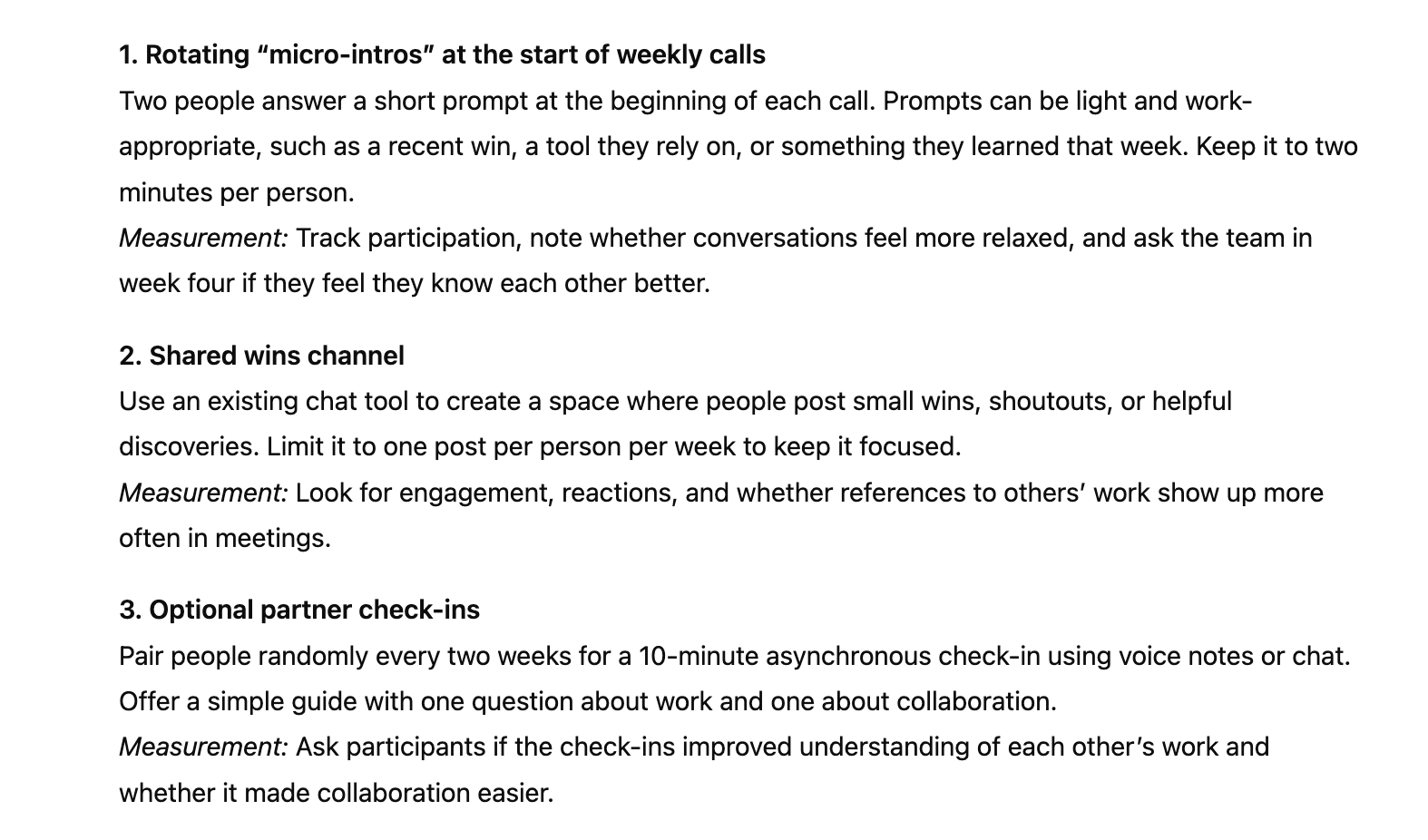
ChatGPT can help with employee development
The best managers are constantly testing new approaches. AI for coaching and employee development conversations includes designing small experiments to improve how your team works.
Maybe you're struggling with remote team engagement:
Starter Prompt:
My remote team of 6 people feels disconnected. Our weekly video calls are productive but transactional. I want to run a 4-week experiment to build more connection without adding unnecessary meetings. Suggest three different lightweight approaches we could try, including how I'd measure if they're working.
Or maybe you're trying to improve how your team handles feedback:
Starter Prompt:
I want to help my team get better at giving each other constructive feedback. Right now they avoid it or make it too blunt. Design a 30-minute workshop activity I could run where they practice using a simple feedback framework. Include the framework, the activity structure, and example scenarios they could practice with.
This is generative AI for strategic planning at the team level—using AI to structure your thinking about experiments, not to determine what your team needs.
Write Good Manager Prompts Using the CRISP Framework
Use the CRISP framework to build manager level prompts:
Context: What's the situation? Who's involved?
Role: What are you trying to do as a manager?
Input: What information do you have?
Specifics: What constraints or preferences matter?
Purpose: What will you do with the output?
Compare these two prompts:
Weak: "Write an email about project delays."
Strong: "I manage a team delivering a client project that's now two weeks behind schedule due to unexpected technical challenges (Context). I need to update the client while maintaining their confidence (Role and Purpose). The delays were genuinely unforeseeable—a third-party API changed without notice (Input). Keep the tone professional and solution-focused, under 150 words, and include a revised timeline (Specifics)."
The second prompt using the CRISP framework and gives you a usable output on the first try.
Check out our prompt library and templates for managers for more prompting magic.
What AI Can't Do (And Why That Matters)
Using AI as manager doesn't mean AI should manage your team. ChatGPT doesn't know your team's dynamics, your organizational culture, or the subtle context that makes the difference between good management and great management.
As a manager, you try using AI for:
Structuring your thinking
Generating options you might not have considered
Finding language when you know what you want to say but can't find the words
Organizing information
Creating first drafts
But avoid using AI for:
Making decisions about people
Understanding team morale
Reading between the lines of what someone is really saying
Determining what your team needs from you
Replacing genuine human connection
The managers who get the most from AI are those who see it as a tool for doing their job better, not for doing their job for them.
Your First Week Experimenting with ChatGPT
Start experimenting with AI for people management. Here’s a short five-day plan to get started:
Day 1: Pick one upcoming meeting. Use ChatGPT to draft an agenda and prepare talking points.
Day 2: Take an email you're dreading to write. Use AI to get a first draft, then edit it in your voice.
Day 3: Upload meeting notes from your last team discussion. Ask ChatGPT to identify themes and action items.
Day 4: Think of a small team challenge. Ask ChatGPT to help you design a two-week experiment.
Day 5: Reflect on what worked. What saved you time? What needed heavy editing? Adjust your approach.
The goal isn't to use AI for everything—it's to find the spots where it genuinely helps you be a better manager.
AI and management
How managers can use AI at work is less about technology and more about judgment. The best generative AI starter guide for managers is simply this: start with real problems, use AI to think through them more effectively, and always add the human insight that only you can provide.
Your team doesn't need you to be an AI expert. They need you to be a great manager. If AI helps you do that—by saving time on administrative work, helping you find better words, or structuring your thinking—then it's worth learning.
Start simple. Pick one scenario from this guide. Try it this week. Build from there.
Ready to help your team use AI?
We’re launching our AI Adoption Toolkit for Managers in 2026 featuring ready-to-use templates, champion selection frameworks, and implementation plans. Curious? Contact us to learn more.